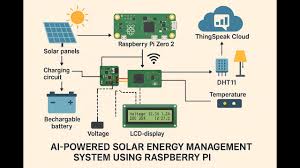
Setting up DIY solar monitoring with a Raspberry Pi allows you to track your solar panel’s performance in real-time. You gain insights into energy production, consumption, and system health, offering a deeper understanding and more control over your home’s solar power.
Understanding Your Solar Energy Flow
Solar panels are amazing. They work silently to convert sunshine into electricity. But for most of us, what happens after that conversion is a bit of a mystery.
You see the meter spin, or a number on an app. That’s good, but it doesn’t tell the whole story. You might wonder: How much power did I really make today?
How much did I use? How much did I send back to the grid? And what happens when the sun isn’t shining?
Understanding this flow is key. It’s not just about saving money, though that’s a big part of it. It’s also about knowing your home’s energy habits.
It’s about seeing how efficient your system is. It’s about spotting problems before they become big issues. Without good monitoring, you’re sort of flying blind.
You might be missing out on savings or not getting the most from your investment.
Why a Raspberry Pi for Solar Monitoring?
So, why choose a Raspberry Pi for this job? It’s a tiny, affordable computer. It’s super flexible.
You can hook it up to all sorts of sensors and devices. For solar monitoring, this means you can connect it to your solar inverter or charge controller. You can even add sensors for things like battery levels or grid voltage.
It’s like giving your solar system a smart brain.
Other monitoring systems can be costly. They often come with fancy, closed-off apps. A Raspberry Pi lets you build something that fits your needs exactly.
You’re not limited by what a company decides you should see. You can collect the data you want. You can display it how you want.
It puts you in the driver’s seat. Plus, it’s a fun project that teaches you new skills.
Getting Started: What You’ll Need
Let’s talk about what you’ll need to get this project going. Don’t worry, it’s not as complicated as it sounds. Most of these items are readily available online or at electronics stores.
Think of it as gathering your ingredients for a great meal. You need the right stuff to make it work.
First, you’ll need a Raspberry Pi. A Raspberry Pi 3B+ or a Raspberry Pi 4 is a great choice. They’re powerful enough for this task.
You’ll also need a micro SD card. This is where the operating system and your monitoring software will live. A 16GB or 32GB card is usually plenty.
You’ll also need a power supply for the Pi itself. A reliable one is important.
Next, you’ll need a way to connect the Pi to your solar system. This often involves a communication cable. Many solar inverters have ports like RS485, RS232, or even USB.
You might need a USB-to-serial adapter or a specific communication module. Check your inverter’s manual to see what it supports. This is a really important step.
Getting this connection wrong means no data.
You’ll also want a case for your Raspberry Pi. This protects it. It’s especially important if you’re putting it somewhere that might get a little dusty or humid.
And finally, you’ll need access to your solar inverter’s data protocol. Some manufacturers make this easier than others. You might find open-source libraries or documentation online.
Connecting Your Raspberry Pi to Your Solar Inverter
This is where the magic starts to happen. Connecting your Raspberry Pi to your solar inverter is like opening a direct line of communication. It allows the Pi to ask your inverter for data.
Things like current power output, daily energy generated, and voltage levels can be pulled directly. This is the heart of your DIY solar monitoring with Raspberry Pi setup.
The exact method depends heavily on your inverter brand and model. Many modern inverters use protocols like Modbus. This is a common way for industrial devices to talk to each other.
If your inverter supports Modbus over RS485, you’ll likely need a USB-to-RS485 adapter. You plug the adapter into the Pi’s USB port. Then, you wire the RS485 terminals on the adapter to the RS485 terminals on your inverter.
Always, always, always double-check your inverter’s manual for the correct wiring diagram. Incorrect wiring can damage your equipment.
Some inverters might have a simpler USB port that exposes data. Others might use Wi-Fi or Ethernet for data logging. In those cases, you might just need to configure the network settings on the inverter and then use software on the Pi to access that data over your home network.
It’s less about physical wires and more about network addresses.
I remember setting this up for a friend’s off-grid cabin. Their inverter was older, using a serial port. We had to find a specific USB-to-serial cable that worked with it.
For days, I just saw gibberish on my screen. It felt like trying to understand a foreign language. Then, I found a community forum post.
Someone had figured out the exact data format for that specific inverter. It was a breakthrough! Suddenly, numbers appeared.
It was so exciting to see actual watts and amp-hours coming in.
Software Setup: The Brains of the Operation
Now that the hardware is mostly sorted, let’s talk about the software. This is what tells your Raspberry Pi how to talk to the inverter and what to do with the data. You’ll need to install an operating system on your SD card.
Raspberry Pi OS (formerly Raspbian) is the go-to. It’s Linux-based and very user-friendly.
Once the OS is running, you’ll install specific software packages. For Modbus communication, you might use libraries like `pymodbus` in Python. If your inverter has a different protocol, there are often community-developed scripts or tools available.
You can find these on sites like GitHub. People often share their solutions for popular inverter brands.
The software will do a few things:
1. Connect to the inverter. 2.
Read specific data registers (these are like memory addresses where the inverter stores information). 3. Parse that data into understandable values (like watts, volts, amps).
4. Store this data. You could save it to a local file (like a CSV) or send it to a database.
5. (Optional) Display the data on a dashboard.
For displaying data, there are some fantastic options.
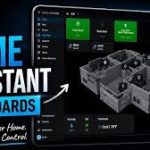
Things like Grafana are popular. You can set up Grafana to pull data from a database (like InfluxDB, which is great for time-series data) and create beautiful, custom dashboards. You can see graphs of your energy production over an hour, a day, or a month.
This is where the visual part of DIY solar monitoring with Raspberry Pi really shines.
I’ve spent hours tweaking Grafana dashboards. Initially, I just wanted to see the power output. But then I thought, “What about battery voltage?” So I added that.
Then, “How much energy did I use while the sun was shining?” So I added consumption data. Each addition made the whole picture clearer. It felt like I was becoming an energy detective in my own home.
The satisfaction of seeing all those lines and numbers come together is immense.
Common Data Points to Monitor
When setting up your system, aim to collect these key pieces of information:
- Current Power Output: How many watts your panels are generating right now.
- Daily Energy Production: Total kilowatt-hours (kWh) generated today.
- Total Energy Production: Overall kWh generated since installation.
- Inverter Temperature: Helps monitor the health of the inverter.
- Grid Voltage and Frequency: Important for understanding grid stability.
- Battery State of Charge (if applicable): Percentage of charge in your batteries.
- Current AC/DC Voltage and Amperage: Detailed electrical readings.
Storing and Visualizing Your Solar Data
Collecting data is only half the battle. You need to store it properly so you can look back at it. And you need to see it in a way that makes sense.
This is where databases and dashboard tools come into play. They turn raw numbers into useful insights for your DIY solar monitoring with Raspberry Pi project.
For storing time-stamped data, a time-series database is ideal. InfluxDB is a very popular choice for this. It’s designed to handle large amounts of data that have a timestamp associated with them.
You can install InfluxDB directly on your Raspberry Pi. Your Python scripts can then write the data they collect straight into InfluxDB.
Once your data is in InfluxDB, you can use a visualization tool to create dashboards. Grafana, as mentioned before, is excellent. It connects to InfluxDB and lets you build custom panels.
You can choose line graphs, bar charts, gauges, or single-value displays. You can set the time range to look at the last hour, day, week, or even month.
Imagine seeing a graph showing your solar production peak around noon. Then, you see your home’s energy usage spike in the evening when everyone’s home. You can overlay these to see how much of your usage is covered by your solar generation.
This kind of visual representation makes a huge difference. It helps you spot patterns and make informed decisions about your energy use.
I recall setting up a dashboard for a user who was concerned about their energy bills. They had solar but weren’t sure if it was making a difference. We set up their Raspberry Pi to log production and their smart meter data for consumption.
When we put it all into Grafana, they could clearly see the times of day their solar was most effective. They also saw times when they were drawing heavily from the grid. This led them to adjust their appliance usage.
They started running the washing machine and dishwasher during peak solar hours. Their next bill was noticeably lower. That was a huge win for them and for the project.
Dashboard Design Tips
Make your solar dashboard work for you:
- Keep it Simple: Don’t overload it with too much information at once.
- Focus on Key Metrics: Show what’s most important to you (e.g., current power, daily kWh).
- Use Clear Labels: Make sure units (W, kW, kWh, V, A) are obvious.
- Color Coding: Use colors to highlight important states or trends.
- Mobile Friendly: Ensure your dashboard looks good on a phone too.
Advanced Monitoring and Automation Ideas
Once you have the basics of DIY solar monitoring with Raspberry Pi down, you can get even more creative. The Raspberry Pi is a powerful little computer. You can use its capabilities for more than just displaying data.
You can start automating tasks or getting alerts.
For example, you could set up alerts if your solar production drops unexpectedly. Or if your battery voltage gets too low. You can have the Pi send you an email or a text message.
This is invaluable for off-grid systems or if you’re away from home often. Early warnings can prevent damage or downtime.
Another cool idea is to integrate your solar monitoring with other smart home devices. If your solar system has excess capacity, you could program the Pi to automatically turn on a high-demand appliance, like a pool pump or an electric vehicle charger. This helps you maximize self-consumption of your solar power.
You’re essentially making your home smarter and more energy-efficient.
Some people also use their Raspberry Pi to log weather data, like temperature and solar irradiance (how much sunlight is actually hitting the panels). By correlating this data with your solar production, you can get a much clearer picture of your system’s performance. You can see how much your production is affected by cloud cover or heat.
This helps in understanding the true efficiency of your panels.
I once helped a friend automate their greenhouse’s ventilation. They had a small solar setup to power fans. We used the Raspberry Pi to monitor the solar battery charge.
When the battery was full and the sun was strong, the Pi would turn on the fans. This ensured they were using their solar power effectively and keeping their plants cool. It was a simple automation, but it made a big difference for them.
Quick Scan: Automation Ideas
- Low Battery Alert: Get notified before your batteries run dry.
- Excess Solar Trigger: Automatically run appliances when you have surplus power.
- System Health Check: Receive alerts for unusual inverter behavior.
- Weather Correlation: Log weather data to better understand production variations.
Troubleshooting Common Issues
Even with the best plans, things can go wrong. Troubleshooting is a normal part of any DIY project, especially one involving electronics and communication protocols. Here are some common issues you might face with DIY solar monitoring with Raspberry Pi, and how to approach them.
No Data Showing Up: This is the most common and frustrating one. Check Physical Connections: Is the communication cable plugged in securely at both ends? Are the wires to the inverter correct?
Verify Inverter Protocol: Are you sure you’re using the right communication method (Modbus, serial, etc.) and parameters (baud rate, data bits, parity)? Double-check your inverter’s manual. Test the Communication Cable: If you have a USB-to-serial adapter, does the Raspberry Pi even see it?
You can check this with commands like `lsusb` or `dmesg` in the Pi’s terminal. Try a Different Script/Library: Sometimes the software you’re using might have a bug or be incompatible. Look for alternatives or community-supported scripts for your specific inverter.
Data Seems Incorrect: If you’re getting numbers, but they don’t make sense (e.g., negative power output, wildly fluctuating voltages). Check Data Parsing: Your software might be interpreting the raw data incorrectly. The order of bytes, data types (signed vs.
unsigned integers), and scaling factors are critical. This is a common pitfall with protocols like Modbus. Compare with Inverter’s App: If your inverter has its own app or display, compare the readings side-by-side.
This helps identify if the issue is with your Pi setup or the inverter itself.
Raspberry Pi Crashing or Freezing:
Power Supply Issues: An underpowered or unstable power supply is a frequent culprit. Ensure you’re using a good quality power adapter with enough amperage.
Overheating: If your Pi is in a warm, enclosed space without ventilation, it can overheat and shut down. A simple case with a fan can help. * SD Card Corruption: SD cards can fail, especially with frequent read/write cycles or sudden power loss.
Try re-flashing the OS or using a different SD card.
When I was first learning about this, I spent an entire weekend trying to get data from an older SMA inverter. It was using a proprietary protocol.
I had the physical connections right. I was sure I had the right software. But the numbers were just garbage.
I was about to give up. Then, I found an obscure forum thread from years ago. Someone had reverse-engineered the serial communication.
They shared a small Python script. It took me an hour to adapt it. When I ran it, boom!
Perfect data. It’s those little victories that make the struggle worthwhile.
Troubleshooting Checklist
When things go wrong, go through these steps:
- Verify Physical Connections: Wires, ports, adapters.
- Confirm Inverter Settings: Protocol, baud rate, IP address.
- Check Raspberry Pi OS: Is it up to date? Are necessary packages installed?
- Isolate the Problem: Test components one by one if possible.
- Consult Online Communities: Forums and GitHub are your friends!
What This Means For Your Solar System
Having detailed, real-time data from your solar system is incredibly powerful. For starters, it means you can truly understand how much energy you’re producing and when. This isn’t just about numbers; it’s about optimizing your home’s energy use.
You can see the impact of weather. A cloudy day will show a lower production curve than a sunny one. You can also see how shade from trees or buildings affects specific panels if your system is granular enough.
This kind of information helps you appreciate your system’s performance under different conditions. It helps you set realistic expectations.
Furthermore, it allows for proactive maintenance. If your system’s production suddenly drops without an obvious reason (like bad weather), it’s a signal to investigate. Perhaps a connection has loosened, or an inverter is starting to fail.
Catching these issues early can save you from significant downtime and potentially expensive repairs down the line. This proactive approach is a huge benefit of DIY solar monitoring with Raspberry Pi.
For those with battery storage, this monitoring is even more critical. You can track your battery’s state of charge, its charging and discharging rates, and its overall health. This helps you manage your energy reserves effectively, ensuring you have power when you need it, especially during grid outages or peak demand times.
In essence, detailed monitoring transforms your solar setup from a ‘set it and forget it’ system into something you can actively manage and understand. It gives you the knowledge to make smarter decisions about your energy consumption and to ensure your investment is performing at its best.
Real-World Scenarios
See how monitoring helps:
- Scenario 1: A homeowner notices their afternoon production is lower than usual. They check their dashboard and see it coincides with increased shade from a neighbor’s new tree. They plan for future panel cleaning or trimming.
- Scenario 2: An off-grid family sees their battery voltage dropping faster than expected. They realize they’ve been using a high-draw appliance more than usual. They adjust their usage to conserve battery power until the sun is strong enough to recharge it.
- Scenario 3: A person installing a new solar system uses their DIY monitor to verify that the installer connected everything correctly and that the system is performing as expected right from day one.
When Is It Time to Worry?
While most solar monitoring provides peace of mind, there are specific situations where you should pay closer attention. If your DIY solar monitoring with Raspberry Pi shows unusual patterns, it’s time to investigate. One of the biggest red flags is a sudden, unexplained drop in energy production that doesn’t correlate with weather conditions.
If your system consistently produces less energy than it did in previous weeks or months, and the weather has been similar, it could indicate a problem. This might be with the panels themselves, the inverter, or the wiring. Don’t ignore significant dips.
They can point to developing issues that are easier to fix when they’re small.
Another concern is if your inverter starts showing error codes. Most inverters have indicator lights or display messages for faults. If your monitoring system can read these error codes, pay attention to them.
They often tell you exactly what the problem is.
For systems with batteries, watch for rapid discharge rates when no significant loads are active. This could mean the battery is degrading or there’s a parasitic drain somewhere in the system. Also, be wary if batteries are not reaching their full charge capacity, even on very sunny days.
The good news is that your DIY monitoring setup is your first line of defense. By regularly checking your data, you build an intuitive understanding of what “normal” looks like for your system. This makes it much easier to spot when something is out of the ordinary.
If you see something concerning, it’s wise to consult your solar installer or a qualified technician to get it checked out.
Signs Your System Might Need Attention
- Significant Production Drop: Production is consistently lower than normal, not due to weather.
- Inverter Error Codes: The inverter is displaying fault messages.
- Rapid Battery Discharge: Batteries losing charge quickly without heavy appliance use.
- Incomplete Battery Charging: Batteries not reaching full capacity.
- Unusual Noises: Strange sounds coming from the inverter.
Quick Tips for Success
To wrap things up, here are a few quick tips to make your DIY solar monitoring with Raspberry Pi project a success:
- Read Your Inverter Manual First: This is crucial. It tells you what data is available and how to access it.
- Start Simple: Focus on getting basic data (like current power and daily energy) working first. Then, add more complexity.
- Use Reputable Online Resources: Many forums and communities share scripts and troubleshooting advice.
- Power Your Pi Well: Use a good quality power supply. An unstable Pi leads to unstable data.
- Backup Your Configuration: Keep copies of your scripts and configuration files. If your SD card fails, you won’t have to start from scratch.
- Label Everything: Label wires and components. It makes troubleshooting much easier later.
- Be Patient: DIY projects take time. Don’t get discouraged if it doesn’t work perfectly on the first try.
Frequently Asked Questions
What is the most important data to monitor for a home solar system?
The most important data points include current power output (watts), daily energy production (kWh), and total energy production (kWh). For systems with batteries, battery state of charge and voltage are also critical. Monitoring inverter temperature can also help identify potential issues.
Do I need to be a programmer to set up Raspberry Pi solar monitoring?
While some programming knowledge (especially Python) is helpful for advanced customization, you can get started using existing scripts and guides. Many open-source projects provide pre-written code that can be adapted with minimal coding. The key is often configuration rather than extensive programming.
How much does a Raspberry Pi solar monitoring setup typically cost?
The cost can vary, but generally, it’s quite affordable. A Raspberry Pi board might cost $35-$75. You’ll also need an SD card ($10-$20), a power supply ($10-$15), and potentially a communication adapter (e.g., USB-to-RS485, $15-$30).
Total setup can often be kept under $150, significantly less than many commercial monitoring solutions.
Is it safe to connect a Raspberry Pi to my solar inverter?
Yes, it is generally safe if done correctly. You are typically connecting to the inverter’s communication port, not its high-voltage DC or AC output. However, always follow the inverter manufacturer’s instructions for data communication and ensure you are using the correct wiring and adapters to avoid damaging your equipment.
Can I monitor multiple solar arrays or inverters with one Raspberry Pi?
Yes, a single Raspberry Pi can often monitor multiple inverters or arrays. You might need additional communication interfaces (like multiple USB adapters if using RS485) or a more powerful Raspberry Pi model depending on the data volume. The software would then need to be configured to read from each device.
What happens if my internet connection goes down? Does my monitoring stop?
If your Raspberry Pi is primarily logging data locally (to an SD card or a local database) and only sending it to the cloud for remote viewing, your monitoring will continue even without an internet connection. You will lose real-time remote access, but the data collection itself will keep running. You can view the data later once the internet is restored.
Conclusion
Embarking on DIY solar monitoring with Raspberry Pi is a rewarding journey. It empowers you with detailed insights into your solar system’s performance. You gain control and a deeper understanding of your home’s energy.
With a bit of patience and the right guidance, you can build a powerful monitoring system that serves your specific needs. Enjoy watching your solar energy come to life!