A Simple Guide to Building Your Own Home Energy Dashboard
Ever looked at your electric bill and wondered where all that energy actually goes? You’re not alone. Many of us feel a bit lost when it comes to understanding our home’s power use. It’s like a big mystery. This guide will help you shine a light on that mystery. We’ll show you how to make your own home energy dashboard. You’ll learn to see your energy habits clearly. This can help you save money and be more eco-friendly.
Building a DIY home energy dashboard lets you see your electricity use in real time. It’s a powerful way to understand your home’s energy patterns. This knowledge helps you find ways to use less power. You can then save money on your utility bills. It’s an empowering project for any homeowner.
What is a Home Energy Dashboard?
Think of a home energy dashboard as a control panel for your house’s electricity. It shows you how much power your home is using right now. It also shows you how much you’ve used over time. You can often see which appliances use the most energy. It’s like a report card for your home’s energy habits.
Most people only see their total energy use when the bill arrives. This is often a month behind. A dashboard gives you live data. You can see what happens when you turn on the oven. You can also see what happens when you run the washing machine. This real-time feedback is key. It helps you make smart choices about your energy use.
Why Build a DIY Home Energy Dashboard?
The main reason is understanding. When you can see your energy use, you can control it better. You might be surprised by what you find. That old refrigerator might be a big energy hog. Or maybe your entertainment center uses power even when it’s off. A dashboard helps uncover these hidden costs.
It’s also about saving money. Lower energy use means lower bills. Even small changes can add up. If you can identify energy waste, you can fix it. This saves you cash over time. Plus, using less energy is good for the planet. It reduces your carbon footprint.
Finally, it’s a great learning project. You get to explore new technology. You’ll learn about your home. You’ll also gain a sense of accomplishment. It’s a project that pays for itself.
How Does a Home Energy Dashboard Work?
At its core, an energy dashboard needs to measure electricity. It then needs to show you that information. There are a few ways to do this.
One common way is to use sensors. These sensors attach to your electrical panel. They clamp onto the main wires. These clamps can measure the flow of electricity. This is measured in amps. The device then converts this to watts or kilowatts. This is the power your home is using.
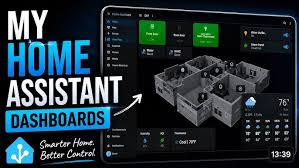
This raw data is then sent somewhere. It could be sent to a small display screen. It could be sent to your smartphone app. Or it could be sent to a computer. This is where your dashboard comes to life. You see charts and numbers. These show your energy use.
Some systems also connect to your utility’s smart meter. If your electric company has a smart meter, it might be able to share data. This can give you very accurate readings. It depends on your utility and what they allow.
My First Dive into Home Energy Monitoring
I remember my first electric bill shock. It was after a hot summer in my first house. I had the AC running constantly. I thought I was being smart by setting it to a steady temperature. But the bill was almost double what I expected. I felt a knot in my stomach. I knew I was using too much energy. I just didn’t know how to stop it.
I started looking for solutions. I found some basic energy monitors. They plugged into outlets. You’d plug a device into the monitor. It would tell you how much power that one device used. That was helpful for individual appliances. But it didn’t tell me my whole home’s total use. I’d have to add up dozens of readings. It was tedious.
Then I stumbled upon the idea of a whole-home energy monitor. It seemed more complex. It involved the main electrical panel. I was a bit nervous about that. My panel looked intimidating. Wires everywhere! But the idea of seeing my total energy use was too tempting. I decided to give it a try. It was a Saturday afternoon. Sunlight streamed through the garage window. I had my new monitor kit and a screwdriver. The instructions looked simple enough. But my hands were a bit shaky at first. I double-checked everything. I made sure the power was off. That was crucial. Safety first! Once installed, I turned the power back on. The little display screen on the monitor lit up. It showed a number. It was changing! It was my home’s power usage, right then. It felt like magic. That was the beginning of my energy dashboard journey.
Different Approaches to DIY Energy Monitoring
There are several paths you can take for your DIY dashboard. Each has its pros and cons.
1. Off-the-Shelf Energy Monitors
These are systems you buy from a store or online. Companies like Sense, Emporia Vue, or IoTaWatt make these. They often come with a main unit for your electrical panel. They also have an app. You install the main unit. Then you download the app. The app shows you your energy data.
These systems are usually the easiest to set up. They are designed for homeowners. They have good support. The apps are often user-friendly. They can show you graphs and charts. Some can even identify individual appliances. This is based on their unique energy “signatures.”
The downside is cost. These systems can be more expensive upfront. You are paying for the convenience and the developed software. You also depend on the company’s servers and app. If they go out of business, your data might be lost.
2. Smart Plugs and Individual Monitors
This is a simpler approach. You buy smart plugs. You plug them into your outlets. Then you plug your appliances into the smart plugs. Many smart plugs can track energy use. You can then view this data on your phone.
This is great for specific devices. You can see how much power your TV uses. Or your gaming console. Or your coffee maker. You can often control these devices remotely too. You can turn them on or off with your phone.
The limitation here is scale. To monitor your whole house this way, you’d need many smart plugs. This can get expensive. Also, you won’t get a true whole-home total in real-time. You’d have to manually add up the readings from each plug. It’s hard to see your overall energy picture this way.
3. Raspberry Pi and Custom Sensors
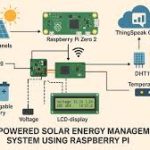
This is for the tech-savvy DIYer. You can use a small computer like a Raspberry Pi. You can connect it to sensors. These sensors can measure voltage and current. You can program the Raspberry Pi to collect this data. Then you can display it on a website. Or send it to a database.
This offers the most flexibility. You can build exactly what you want. You can customize the display. You can integrate it with other smart home systems. You can learn a lot about electronics and coding.
The challenge is complexity. You need to know how to solder. You need to understand programming. You also need to ensure safety. Working with electricity requires care. This is not for beginners. It can also be time-consuming to build.
4. Using Your Utility’s Data
Some utility companies offer access to your smart meter data. They might have an online portal. Or they might offer an API. This means you can get data directly from your meter. You can then use this data to build your dashboard.
This is a great option if available. It uses existing infrastructure. The data is usually very accurate. You might not need to install any new hardware.
The main challenge is availability. Not all utility companies offer this. The data might not be in real-time. It could be daily or hourly. The format of the data might also be tricky to work with. You might need some technical skill to access and use it.
Energy Monitoring Method Comparison
Easiest: Off-the-shelf energy monitors.
Good for Specifics: Smart plugs.
Most Flexible: Raspberry Pi with sensors.
Uses Existing Tech: Utility data access.
Choosing the Right Path for You
The best method depends on your skills and budget.
If you’re new to this, an off-the-shelf system is probably best. Companies like Emporia Vue or Sense offer great solutions. They are designed for ease of use. The app experience is usually good. You can get a whole-home view quickly.
If you only care about a few specific devices, smart plugs are a good start. They are cheap. They are easy to install. You can learn a lot about how individual appliances use power.
If you love tinkering and coding, a Raspberry Pi project is exciting. You’ll learn a ton. You can build a truly custom system. Just remember safety is paramount.
If your utility offers data access, explore that first. It could be the simplest and cheapest way to get started. Check your utility company’s website. Look for sections on smart meters or energy programs.
Installing a Whole-Home Energy Monitor (Emporia Vue Example)
Let’s walk through a common DIY setup. We’ll use the Emporia Vue as an example. This is a popular choice. It’s user-friendly and effective.
What you’ll need:
An Emporia Vue main unit.
The Emporia Vue app on your smartphone.
Basic tools: screwdriver, pliers, possibly a voltage tester.
A helper can be useful.
Safety First!
This is the most important step. You will be working near your main electrical panel.
1. Turn off the main breaker. This cuts power to your entire house. It’s usually a large switch at the top of your panel. Make sure all lights and appliances are off.
2. Verify power is off. Use a voltage tester to confirm there is no power in the panel.
Installation Steps:
1. Open your electrical panel. This usually involves removing a cover.
2. Locate the main power lines. These are the thick wires coming into the panel. There will be two for most homes.
3. Attach the current sensors (clamps). The Emporia Vue comes with clamps. You wrap these around the main power lines. There’s usually a sensor for each line. They are keyed to prevent incorrect installation.
4. Connect the sensors to the main Vue unit. The sensors have wires that plug into the Vue device.
5. Mount the Vue unit. It usually adheres to the inside of your panel or a nearby surface.
6. Connect the Vue unit to your Wi-Fi. This is usually done through the app. The app will guide you through this process. You’ll need your Wi-Fi network name and password.
7. Turn the main breaker back on. Once everything is connected and secured, restore power.
8. Set up the app. Download the Emporia app. Create an account. Follow the on-screen instructions to pair your Vue unit.
The app will then start showing you data. It might take a few minutes for it to calibrate. You’ll begin to see your home’s real-time energy usage.
Quick Vue Installation Checklist
- Gather tools: Screwdriver, pliers, voltage tester.
- Turn off main breaker.
- Verify power is off.
- Attach current sensors to main wires.
- Connect sensors to Vue unit.
- Mount Vue unit.
- Connect Vue to Wi-Fi via app.
- Turn main breaker back on.
- Complete app setup.
Understanding Your Dashboard Data
Once your dashboard is up and running, you’ll see a lot of information. What does it all mean?
Real-Time Usage (Watts/Kilowatts)
This is the most immediate data. It shows how much power your home is using at this exact moment. A typical home might use a few hundred watts when idle. It could jump to several thousand watts when you run the oven or dryer.
Daily/Weekly/Monthly Usage (Kilowatt-Hours or kWh)
This is the total amount of energy consumed over a period. A kilowatt-hour is a standard unit of energy. It’s the energy used by a 1000-watt appliance running for one hour. Your electric bill is based on kWh. Seeing this over time helps you spot trends.
Device Identification (Appliance Signatures)
Some advanced dashboards can identify individual appliances. They learn the unique electrical patterns each device makes. For example, a refrigerator turning on has a specific power draw. An electric heater has another. By analyzing these patterns, the app can tell you which devices are active. This is incredibly useful for finding energy hogs.
Cost Tracking
Many dashboards allow you to input your electricity rates. You can then see your energy use translated into money. This makes the impact of your usage very clear. You can see how much you’re spending per hour or per day.
Usage Graphs and Charts
These are the visual heart of your dashboard. You’ll see line graphs showing usage over time. Bar charts can compare usage between days or weeks. These visuals make it easy to spot spikes and dips. They help you understand your consumption patterns.
Personal Experience: The Coffee Maker Mystery Solved
I thought my coffee maker was innocent. It’s a simple machine, right? Just heats water and brews coffee. But one morning, I was watching my energy dashboard. I saw a small, consistent power draw. It wasn’t a lot, maybe 50 watts. But it was running all the time. Even when it wasn’t brewing.
I realized my coffee maker had a warming plate. This plate kept the coffee hot. It was on 24/7 unless I remembered to turn off the machine. Fifty watts might not sound like much. But it adds up. Fifty watts running 24 hours a day is 1.2 kWh per day. Over a month, that’s about 36 kWh. At my electricity rate, that’s nearly $5 a month. For a coffee maker that I only used for a few hours a day.
It was a small thing, but it bothered me. So, I made a habit. After brewing my coffee, I’d unplug the coffee maker. Or I’d flip the switch to turn it off completely. It took a few days to remember. But soon it became automatic. Seeing that small number on my dashboard drop to zero when the coffee maker was off was satisfying. It was a tiny win. But it showed me the power of real-time data. It wasn’t just about saving a few dollars. It was about being more mindful of where my energy was going. It’s funny how a simple appliance can teach you so much.
Real-World Context: When Energy Use Spikes
Understanding when your energy use goes up is key. Certain activities naturally consume more power.
High Energy Use Scenarios
Morning Rush
When everyone wakes up, multiple appliances might run. Toasters, coffee makers, hair dryers, and lights can all add up quickly. Showers using hot water heaters also draw power.
Laundry Day
Washing machines and especially electric dryers are major energy consumers. Running both back-to-back can cause a significant spike in your usage.
Cooking Big Meals
Ovens, electric stovetops, and even microwaves use a lot of energy. Baking, broiling, or frying for extended periods will show up on your dashboard.
Cooling or Heating
Your HVAC system is often the biggest energy user in your home. Running the air conditioner on a hot day or the furnace on a cold day will show high readings.
These are normal peaks. Your dashboard should show these. What you want to look for are unexpected spikes. Or consistently high usage when you don’t expect it.
Habits That Impact Energy Use
Your daily routines play a huge role.
Leaving lights on: Simple, but common. A light left on in an empty room wastes energy.
Overusing appliances: Running the dryer for a single shirt. Or running the dishwasher when it’s half empty.
Setting thermostats too high or too low: The bigger the difference between inside and outside temps, the more your HVAC works.
“Vampire power” draw: Many electronics use power even when turned off. This is called standby power. Chargers, TVs, computers, and game consoles are common culprits.
What This Means for You: When to Pay Attention
Your energy dashboard is a tool. It helps you make informed decisions.
When Usage Is Normal
You’ll start to recognize your home’s baseline. You’ll see the normal patterns for mornings, evenings, and weekends. When your usage fits these expected patterns, you’re likely doing great.
When to Worry (or Investigate)
Sudden, unexplained spikes: If your usage suddenly jumps way up on a day you didn’t do anything unusual, investigate. Could a new appliance be faulty? Is something running constantly that shouldn’t be?
Consistently high usage: If your daily or weekly totals are always much higher than they used to be, or higher than similar homes, there might be an issue.
High standby power: If your dashboard shows a significant amount of power being used when everything is supposedly off, you have phantom loads to tackle.
Simple Checks You Can Do
Walk around your house: Turn off all lights and electronics you can. Then check your dashboard. Does the number drop significantly?
Check your fridge and freezer seals: Are they sealing properly? A faulty seal makes the motor run more.
Look at your water heater: Is it set too high? Is it older and less efficient?
Unplug chargers and devices: When not in use, unplug them. See if this makes a difference over time.
Quick Fixes and Tips for Lowering Energy Use
Once you see your data, you can make changes.
LED bulbs: Switch old incandescent bulbs to LEDs. They use much less energy.
Smart thermostats: Program your thermostat. Set it to use less energy when you’re asleep or away.
Unplug “vampire” devices: Use smart power strips. They can cut power to devices when they aren’t in use.
Run full loads: Wait until your dishwasher or washing machine is full.
Air dry clothes: When weather permits, air dry your laundry instead of using the dryer.
Seal air leaks: Check for drafts around windows and doors. Use caulk or weatherstripping.
Maintain appliances: Keep them clean and in good working order. This helps them run more efficiently.
Frequently Asked Questions About Home Energy Dashboards
What is the most important thing my energy dashboard can tell me?
The most important thing is understanding your home’s real-time electricity consumption. This shows you exactly when and how your energy is being used, which is key to finding savings.
Do I need an electrician to install a whole-home energy monitor?
For many DIY systems, like the Emporia Vue, you do not need an electrician if you are comfortable and follow safety steps. However, always ensure the main breaker is OFF and verify with a voltage tester. If you are unsure, hiring an electrician is recommended for safety.
How accurate are DIY energy dashboards?
Modern DIY energy monitors are generally quite accurate for whole-home usage. Some advanced systems can even identify individual appliance usage, though this can be less precise than direct measurement for each device. Accuracy can depend on the quality of the sensors and installation.
Can a DIY energy dashboard help me identify energy-wasting appliances?
Yes, absolutely. By observing your real-time usage, you can see which appliances cause the biggest spikes when they turn on. Some dashboards with device identification features are specifically designed for this.
Is a DIY energy dashboard worth the cost?
For most homeowners, yes. The potential savings on electricity bills often outweigh the initial cost of the monitoring equipment within a year or two. Plus, the knowledge gained is valuable.
What is “vampire power” and can my dashboard detect it?
Vampire power, or standby power, is energy used by electronics when they are turned off but still plugged in. Many dashboards, especially those with device identification, can detect this constant low-level draw and help you identify which devices are contributing to it.
Conclusion
Building your own home energy dashboard is a rewarding project. It gives you control over your energy use. You get to see your home’s habits. This knowledge helps you save money and energy. It’s a step towards a smarter, more efficient home. Start small, learn as you go, and enjoy the insights you gain.