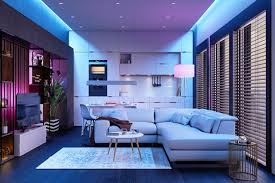
Imagine walking into your home after a long day. With a simple voice command, the lights softly come on, creating a warm, welcoming glow. No fumbling for switches in the dark.
This isn’t science fiction; it’s the reality of automated home lighting. It makes life easier, safer, and can even save you money on energy bills.
Automating home lighting involves using smart devices like bulbs, switches, and plugs. These connect to your home network. You can control them with apps, voice assistants, or set schedules.
This adds convenience, security, and can lower energy use.
What Is Automated Home Lighting?
Automated home lighting is all about making your lights work for you. Instead of flipping a switch, you use technology to control them. This can be a single smart bulb or a whole house system.
The goal is convenience and efficiency. It’s like having a personal light assistant for your home.
Think about your daily routine. Lights are on when you need them. They are off when you don’t.
Automation makes this happen without you thinking about it. It learns your patterns or follows your commands. This makes your home feel more modern and responsive.
Smart lighting systems use different devices. You have smart bulbs that screw into existing lamps. There are smart switches that
The technology behind it is pretty simple. Your devices send signals over your Wi-Fi. These signals tell the lights when to turn on or off.
You can group lights together. For example, “living room lights” could turn on all at once. You can also set “scenes.” A “movie scene” might dim the main lights and turn on accent lights.
This level of control offers many benefits. It adds a touch of luxury. It also makes your home more secure.
You can make it look like someone is home even when you are away. This helps deter potential intruders. Plus, making sure lights aren’t left on saves electricity.
The setup is usually straightforward. Most systems guide you through the process. You download an app.
You connect your smart devices to your Wi-Fi. Then you can start customizing your lighting. You can create schedules for lights to turn on at sunset.
Or turn off when you leave for work.
It’s not just about turning lights on and off. Many smart bulbs change colors. You can set mood lighting for different activities.
Bright white light for reading. Soft yellow light for relaxing. Even vibrant colors for parties.
This adds a whole new dimension to your home decor.
The systems can also integrate with other smart home devices. If your smart lock unlocks, your entryway lights could turn on. If your smoke alarm goes off, all lights might turn on to full brightness.
This enhances safety and convenience. It makes your home work as a connected unit.
My Own Smart Lighting Journey: From Skeptic to Fan
I remember feeling a bit overwhelmed when I first thought about smart lighting. My old house had a simple switch for every light. It worked fine.
Why change it? I thought it was just a fancy gadget. Something for tech enthusiasts, not for regular folks like me.
I was wrong. Very wrong.
It all started with a single smart bulb. I got it as a gift. I put it in my bedside lamp.
The setup was surprisingly easy. I downloaded the app. I connected the bulb.
Then I discovered I could dim it from my phone. No more getting out of bed to find the switch in the dark. That was a small win, but it felt huge.
Then came the true “aha!” moment. It was a cold, rainy evening. I had a big grocery haul.
My hands were full. I was juggling bags, trying to unlock the front door. I finally got inside, still struggling.
I had to drop everything to flip the hallway light switch. It was a mess. Groceries spilled everywhere.
My back ached. I thought, “There has to be a better way.”
That’s when I decided to go all-in on smart lighting. I
What really sold me was the scheduling. I set my porch light to turn on at dusk and off at dawn. No more forgetting to turn it off in the morning.
No more fumbling for the switch when I got home late. It just worked. It felt like my house was thinking for me.
It was freeing.
The biggest surprise was how much I enjoyed the mood lighting. I got a set of color-changing bulbs for my living room. On movie nights, I could dim them and set a warm, cozy color.
When friends came over, I could make it bright and cheerful. It changed the whole feel of the room. It was like having a professional interior designer on call, but for free.
Sure, there were a few bumps. Sometimes the Wi-Fi would glitch, and a light wouldn’t respond. I learned to check my router and reboot devices.
It wasn’t a daily problem, though. And the benefits far outweighed the minor annoyances. It made my home feel more secure, more comfortable, and just plain smarter.
Different Ways to Automate Your Home Lights
You don’t have to overhaul your entire home at once. There are several ways to start automating your lights. Each has its own pros and cons.
You can pick what fits your needs and budget best.
Smart Bulbs: The Easiest Start
What they are: These bulbs screw into your existing light fixtures just like regular bulbs. They have built-in Wi-Fi or Bluetooth. You control them with an app on your phone.
Why choose them: Very easy to install. You can control individual lights. Great for lamps or fixtures where you only want to change one light.
They come in many types: white light, tunable white, and full color. Some can even change brightness.
Things to know: The light switch must stay in the “on” position for the bulb to work. If someone flips the switch off, the smart bulb loses power and can’t be controlled. This can be tricky for guests or family members not used to smart tech.
Smart Switches: For a Cleaner Look
What they are: These replace your existing wall light switches. They connect to your home’s wiring and your Wi-Fi network. They control all the lights connected to that switch.
Why choose them: They offer a seamless look. Your guests use them like normal switches. They control multiple lights at once.
This is great for overhead lights in a room. You don’t need to worry about the physical switch being off.
Things to know: Installation requires basic electrical knowledge. You might need an electrician if you’re not comfortable. They are usually a bit more expensive upfront than a single smart bulb.
Smart Plugs: For Lamps and Non-Fixed Lights
What they are: These small devices plug into a wall outlet. You then plug your lamp or other light fixture into the smart plug. The plug connects to your Wi-Fi.
Why choose them: They are very simple to use. Just plug them in. They are affordable.
Perfect for controlling floor lamps, table lamps, or string lights that aren’t wired in. They allow you to make “dumb” lights smart.
Things to know: The light fixture itself must have an on/off switch that stays in the “on” position. The smart plug controls power to the entire fixture.
Smart Lighting Systems & Hubs: For Full Control
What they are: These are more complex systems. They often use a central “hub” or “bridge.” This hub connects to your router. All your smart lights and devices connect to the hub.
This can offer more reliable connections and advanced features.
Why choose them: They can manage many devices. They often offer more customization. Some systems use their own wireless protocols (like Zigbee or Z-Wave) which can be more stable than Wi-Fi for large setups.
They can integrate deeply with other smart home gear.
Things to know: These are usually the most expensive option. They can be more complicated to set up. A hub might be an extra piece of hardware to manage.
Voice Assistants and Apps: How You Talk to Your Lights
What they are: You use apps on your smartphone or tablet. Or you use voice commands with smart speakers like Amazon Echo or Google Nest. These are the interfaces for controlling your lights.
Why choose them: Voice control is incredibly convenient. Apps let you set schedules, scenes, and control lights from anywhere. Most smart lighting brands work with major voice assistants.
Things to know: Your Wi-Fi network needs to be strong and reliable. Some voice commands can be misheard if not clear. You need to set up routines or scenes in the app to get the most out of voice control.
When Is Automated Lighting a Good Idea?
Automated lighting isn’t just about the cool factor. It solves real problems and adds practical value to your home. Think about these common scenarios.
Scenario 1: The “I Forgot To Turn Off the Light” Panic
Normal Habit: You rush out the door. You wonder if you left the bathroom light on. Or the kitchen light.
You can’t be sure. This causes worry.
Automated Solution: Set schedules. Your lights turn off automatically at a specific time, like when you usually leave. Or you can check your app from anywhere and turn them off with a tap.
This brings peace of mind and saves energy.
Scenario 2: Fumbling in the Dark
Normal Habit: It’s late. You’re carrying groceries, or your hands are full. You need to find the light switch.
It’s a minor annoyance, but it happens often.
Automated Solution: Use voice commands. Simply say, “Hey Google, turn on the porch light.” Or set motion sensors. The lights turn on automatically when you enter a room.
This makes your home safer and more convenient, especially for kids or older adults.
Scenario 3: Wanting a More Welcoming Home
Normal Habit: Your home is dark when you arrive. It can feel unwelcoming. You have to find switches.
It’s not the best first impression.
Automated Solution: Set lights to turn on at sunset. Or create “welcome home” scenes. Your lights can greet you.
You can have soft lighting ready as you walk in. This makes your house feel like a home from the moment you arrive.
Scenario 4: Enhancing Home Security
Normal Habit: You go on vacation. Your house sits dark and empty. This can make it look like an easy target.
Automated Solution: Use vacation modes. Your lights can turn on and off randomly. This mimics normal activity.
It makes your home look occupied. Many systems offer this feature. It’s a simple way to add a layer of security.
Scenario 5: Setting the Mood
Normal Habit: You want a cozy atmosphere for reading. Or bright light for working. You fiddle with dimmers.
It takes effort.
Automated Solution: Create lighting “scenes.” A “reading scene” might set a bright, focused light. A “movie scene” could dim lights and add a soft color. You can switch between moods with a tap or a voice command.
This personalizes your space.
Setting Up Your Smart Lighting System
Getting started with smart lighting is easier than you might think. Here’s a breakdown of what to expect. It’s about taking it step-by-step.
First, decide what you want to automate. Do you want to start with one lamp? Or control all the lights in a room?
This helps you choose the right devices. Smart bulbs are great for individual lamps. Smart switches are better for whole rooms.
Next, check your Wi-Fi. Smart devices need a stable internet connection. If your Wi-Fi is weak in some areas, you might need a mesh Wi-Fi system or a Wi-Fi extender.
Make sure your router can handle multiple devices connecting.
Choose your brand. Many brands offer smart bulbs and switches. Philips Hue, Kasa (TP-Link), Wyze, and Leviton are popular choices.
They often work with different voice assistants like Alexa or Google Assistant. Read reviews to see which ones fit your needs.
Download the app. Once you have your devices, download the corresponding app from your phone’s app store. This app will be your main control center.
You’ll use it to connect devices, set schedules, and create scenes.
Install your devices. If you’re using smart bulbs or plugs, this is as simple as screwing in a bulb or plugging something in. If you’re installing a smart switch, follow the instructions carefully.
If you’re unsure, hire an electrician. Safety first!
Connect to Wi-Fi. The app will guide you through connecting each device to your home Wi-Fi network. You might need to enter your Wi-Fi password.
Some devices might have a setup button to press.
Set up your preferences. Once connected, you can start personalizing. Give your lights names (e.g., “Living Room Lamp”).
Group lights by room. Create custom scenes like “Dinner Time” or “Good Morning.” Set schedules for lights to turn on or off automatically.
Integrate with voice assistants. If you have a smart speaker, link your smart lighting account to your voice assistant app (Alexa app, Google Home app). This lets you control your lights with your voice.
You can say things like, “Alexa, dim the bedroom lights to 50%.”
Test and refine. Try out your new system. See if the schedules work.
Test your voice commands. Adjust brightness or colors as needed. You might find that your initial settings need tweaking.
That’s perfectly normal. It’s an ongoing process of making your home work best for you.
When to Be Concerned About Lighting Behavior
Most of the time, automated lighting works smoothly. But sometimes, odd things can happen. It’s good to know when something might be a real problem, not just a glitch.
Lights Turning On or Off Unexpectedly: If your lights are acting randomly, it could be a few things. A weak Wi-Fi signal can cause devices to drop connection. A faulty device could be the culprit.
Sometimes, a neighbor’s Wi-Fi signal might interfere, though this is rare.
Voice Commands Not Working: Ensure your voice assistant device is powered on and connected to the internet. Check if your smart lighting account is still linked correctly in the voice assistant app. Background noise can also make it hard for the assistant to hear you.
App Not Responding: Make sure your phone has a good internet connection. Try closing and reopening the app. If that doesn’t work, check if there’s an update for the app or your device’s firmware.
Sometimes, the service provider for the smart device might be having an outage.
Lights Flickering: This can sometimes be an issue with the bulb itself. If it’s a smart bulb, it might be overheating or failing. If it’s a smart switch controlling multiple bulbs, one of those bulbs might be faulty and causing the issue.
Always check if the bulb is screwed in tightly.
Inconsistent Performance: Some devices might not perform as reliably as others. Cheaper brands may have more connectivity issues. If you notice a pattern of unreliability with a specific device, it might be time to consider replacing it.
Consider the overall stability of your home network.
Energy Use Not Decreasing: While automation can save energy, it’s not automatic magic. If you’re still leaving lights on unnecessarily or using very bright settings all the time, you might not see savings. Check your schedules.
Are they set to turn lights off when you’re not home?
Electrical Smells or Sounds: This is a serious concern. If you ever smell burning plastic or hear buzzing from a switch or outlet, turn off the power immediately at the breaker box. Do not use the device.
Contact a qualified electrician. This could indicate a fire hazard.
If you experience consistent issues, it might be time to troubleshoot. Start with the basics: check your Wi-Fi, reboot devices, and ensure everything is updated. If problems persist, contact the manufacturer’s customer support.
They can often guide you through more advanced troubleshooting.
Quick Tips for Smarter Lighting
Here are some easy ways to get more out of your automated home lighting.
- Start Small: Don’t try to automate everything at once. Begin with one or two rooms or a few key lights. See how you like it before expanding.
- Use Schedules Wisely: Set lights to turn on at dusk and off at dawn. This is great for outdoor lights and hallways. You can also set lights to turn off at specific times when you know you won’t be home.
- Create Scenes for Activities: Have a “Movie Night” scene that dims lights and sets a cozy color. Have a “Wake Up” scene that slowly brightens your bedroom lights.
- Leverage Voice Control: Get a smart speaker. This makes turning lights on or off hands-free very easy. It’s perfect when your hands are full.
- Consider Dimmer Switches: Most smart bulbs and switches allow dimming. Using lower brightness levels saves energy and creates a softer ambiance.
- Group Lights by Room: This lets you control multiple lights with a single command. “Turn off the living room” affects all the lights in that area.
- Use Motion Sensors: These are great for areas like closets, pantries, or hallways. Lights turn on when you enter and off after a period of no motion. This saves energy and adds convenience.
- Check Your Wi-Fi Strength: Poor Wi-Fi can cause connectivity problems. Make sure your router is working well and covers all areas where you have smart lights.
- Keep Apps and Firmware Updated: Manufacturers release updates to fix bugs and improve performance. Make sure your apps and device firmware are up-to-date.
- Don’t Forget Manual Control: Even with automation, ensure there’s a way to turn lights on and off manually. Smart switches are good for this. If you only use smart bulbs, make sure everyone knows not to turn off the wall switch.
Frequently Asked Questions About Automated Lighting
Do I need a special hub for smart lights?
It depends on the brand. Some smart bulbs and switches connect directly to your Wi-Fi. Others, like Philips Hue, use a bridge or hub.
The hub connects to your router and communicates with the lights. Check the product details to see if a hub is required.
Can I control my smart lights when I’m away from home?
Yes, most smart lighting systems let you control your lights remotely. As long as your phone has an internet connection and your home Wi-Fi is working, you can turn lights on or off from anywhere.
Will smart lighting save me money on my electricity bill?
Yes, they can help save money. You can schedule lights to turn off automatically. You can use dimmer settings to reduce energy consumption.
Plus, by ensuring lights aren’t left on when not needed, you reduce wasted electricity.
Are smart light switches difficult to install?
Installing a smart switch typically involves basic electrical wiring. You’ll need to turn off the power at the breaker first. If you’re not comfortable working with electricity, it’s best to hire a qualified electrician to install them safely.
Can I mix different brands of smart lights together?
It can be tricky. Some brands work well with others through platforms like Google Home or Amazon Alexa. However, for the best and most reliable experience, it’s often recommended to stick with one brand or ecosystem for your lighting.
What happens to my smart lights if my internet goes out?
This depends on the system. Some devices may stop working altogether. Others might retain their last settings or schedules.
If you rely on voice commands or app control, these will not work without an internet connection. Some systems have a local control option via a hub.
Can smart lights be controlled by multiple people in the house?
Yes. Most smart lighting apps allow you to invite other users to control the devices. This means family members can also use the app or voice commands to manage the lights.
The Future of Home Lighting
Automated home lighting is more than a trend; it’s becoming a standard. As technology advances, we can expect even more integration and intelligence. Lights will likely adapt more intuitively to our needs.
They might adjust based on natural light levels, our presence, or even our mood detected by other sensors. The goal is a home that truly cares for us.