How Smart Homes Help Cut Energy Bills
Living in a smart home is becoming easier and more common. Many people are wondering if these clever gadgets can actually help save money. The answer is a big yes. Smart home tech can make your house much more energy efficient. This means lower electricity and gas bills for you. You’ll also be doing your part for the planet. It’s a win-win situation.
Smart homes reduce energy use by automating tasks, optimizing appliance function, and providing detailed usage data. This leads to lower utility bills and increased home comfort through efficient resource management and personalized control.
Understanding Energy Use at Home
Think about all the things in your home that use power. Lights, heating, cooling, appliances like your fridge and TV, and even small chargers all add up. Most of this energy use happens without us even thinking about it. Lights are left on in empty rooms. The thermostat is set too high or too low. Appliances sit on standby, still using a little power. These small wastes add up to big bills. Understanding where your energy goes is the first step to saving it.
The Silent Energy Wasters
Many everyday items can quietly drain power. Old appliances are often big culprits. They aren’t built with the same energy-saving features as newer models. Even when turned off, many electronics use “phantom load.” This is like a small trickle of power they use just by being plugged in. Things like your TV, game console, or computer can use surprising amounts of power on standby. It’s like leaving a small light on all the time.
The Role of Heating and Cooling
Heating and cooling systems often use the most energy in a home. This is especially true in places with very hot summers or cold winters. Your furnace or air conditioner works hard to keep your house comfortable. If your thermostat is set too high in winter or too low in summer, you’re asking it to work harder than needed. This uses much more energy. Poor insulation or leaky windows also make these systems work overtime.
Smart Devices That Cut Energy Use
Smart technology offers many ways to make your home more energy efficient. These devices are designed to be smarter about how and when they use power. They can learn your habits, respond to the environment, and be controlled from anywhere. This gives you much better control over your home’s energy consumption.
Smart Thermostats: Your Home’s Brain for Temperature
Smart thermostats are one of the most popular smart home devices. They connect to your home’s heating and cooling system. You can control them with your phone or by voice. Many smart thermostats can learn your schedule. They will automatically adjust the temperature when you’re away or asleep.
For example, if you leave for work every day at 8 AM, your thermostat can learn to start cooling down your house around 7:30 AM. Then, it can raise the temperature slightly when you leave. This way, you aren’t heating or cooling an empty house. When you get home, it’s already comfortable.
Some smart thermostats also have features like geofencing. This uses your phone’s location to know when you’re home or away. If you forget to adjust the temperature, your phone can tell the thermostat to do it for you. This avoids energy waste without you having to remember.
Features to Look For in Smart Thermostats
Learning capabilities: Can it learn your schedule?
Remote control: Can you use an app on your phone?
Geofencing: Does it use your phone’s location?
Energy reports: Does it show you how much energy you’re using?
Integration: Does it work with other smart devices?
Smart Thermostat Quick Guide
Learn Your Habits: Most smart thermostats watch how you set the temperature. They start to learn your daily and weekly patterns. Then, they set schedules for you.
This saves energy without you doing anything.
Sense When You’re Out: Some use your phone’s GPS. When you leave, it adjusts the temp. When you come back, it makes it comfy again.
Check From Anywhere: You can change settings from your phone. So if plans change, you can save energy.
Get Usage Insights: You can see reports. These reports show how much energy you used and when. This helps you find ways to save more.
Smart Lighting: Bright Ideas for Saving Power
Smart light bulbs and switches are another great way to reduce energy use. You can control these lights using an app or voice commands. Many smart bulbs use LED technology. LEDs use much less energy than old incandescent bulbs. They also last a lot longer.
You can set schedules for your lights to turn on and off automatically. Imagine your porch light turning on at dusk and off at dawn. Or your living room lights dimming in the evening. This prevents lights from being left on unnecessarily.
Smart plugs can also be used with lamps. These plugs connect to your Wi-Fi. You can then turn lamps on and off remotely. You can also set schedules for them. This is perfect for accent lighting or lamps in rooms you don’t use often.
Key Benefits of Smart Lighting
Energy Savings: LEDs use less power.
Convenience: Control lights from anywhere.
Automation: Set schedules and timers.
Mood Setting: Dimming and color control.
Security: Make it look like someone is home.
Smart Lighting Scenarios
- Morning Routine: Lights slowly brighten in the bedroom to wake you gently. Other lights stay off until you need them.
- Leaving Home: A single command turns off all lights. Or they turn off automatically based on a timer or when your smart lock engages.
- Evening Relaxation: Lights in the living room dim to a warm glow. Task lighting turns on in the kitchen if needed.
- Away Mode: Lights turn on and off at random times to simulate occupancy, improving home security and saving energy.
Smart Plugs and Outlets: Taming Phantom Load
Remember that “phantom load” we talked about? Smart plugs are a fantastic solution for this. You plug a device into a smart plug, and then plug the smart plug into the wall. You can then control the power going to the device using an app or a schedule.
This means you can tell your TV, game console, or even your coffee maker to completely cut power when it’s not in use. Many smart plugs allow you to set schedules. You can program them to turn off at midnight. Or turn on only when you need them.
Some smart plugs even monitor energy usage. They can show you how much power a specific device is using. This information is gold for finding energy-guzzling appliances. You can then decide which devices to power down completely.
How Smart Plugs Help Save Energy
Eliminate Phantom Load: Cut power to devices completely.
Schedule Automation: Set timers for devices to turn off.
Monitor Usage: Track how much energy devices use.
Remote Control: Turn devices on or off from your phone.
Convenience: No need to unplug multiple devices.
Smart Plug Energy Saving Tips
Label Your Plugs: Clearly mark which device is connected to each smart plug. This makes managing them easier.
Identify Vampires: Use smart plugs with energy monitoring. Plug in items like entertainment centers or computer setups. See which ones use the most power when off.
Set Daily Off-Times: Program plugs for items like printers, chargers, or even your Wi-Fi router (during sleep hours if possible) to turn off overnight.
Create “All Off” Scenes: Link smart plugs to a smart home hub. Then create a routine to turn off many devices at once when you leave or go to bed.
Smart Appliances: Efficiency Built-In
Many newer home appliances now come with smart technology. This includes refrigerators, ovens, dishwashers, and washing machines. Smart appliances can often be controlled remotely. They can also offer more energy-efficient modes.
For example, a smart washing machine might have an eco-mode that uses less water and electricity. It might also allow you to schedule washes for off-peak hours when electricity rates are lower. Some smart fridges can alert you if the door has been left open, preventing energy loss.
While smart appliances can be an investment, their built-in efficiency features can lead to significant savings over time. They are designed with modern energy standards in mind, often surpassing older models.
Smart Appliance Advantages
Optimized Cycles: Run loads more efficiently.
Remote Monitoring: Check on appliance status.
Off-Peak Scheduling: Save money with lower energy rates.
Usage Data: Understand appliance energy consumption.
Maintenance Alerts: Keep appliances running smoothly.
Smart Window Treatments: Controlling Sunlight
Smart blinds and shades can also play a role in energy efficiency. During hot summer days, closing blinds can block out the sun’s heat. This helps keep your home cooler. It reduces the need for air conditioning.
In the winter, opening blinds during the day lets in sunlight. This natural heat can help warm your home. Then, closing them at night can help keep that warmth inside.
These treatments can be scheduled to open and close automatically. You can also control them with an app. They can even work with smart thermostats. They might close automatically when the thermostat senses the room is getting too hot from the sun.
How Smart Treatments Help
Passive Heating: Let sun warm home in winter.
Passive Cooling: Block sun’s heat in summer.
Automation: Schedule open/close times.
Integration: Work with other smart devices.
Comfort: Maintain a more stable indoor temperature.
The Power of Integration: Creating a Smarter Ecosystem
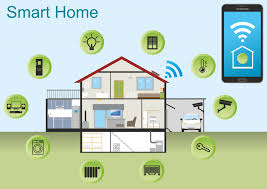
One of the biggest advantages of smart home technology is integration. Most smart devices can connect to a central hub or a system like Amazon Alexa, Google Home, or Apple HomeKit. This allows devices to work together.
This integration is where the real energy savings can happen. Imagine a scenario: You say “goodbye” to your voice assistant as you leave. This one command could trigger several actions. Your smart thermostat sets to an away mode. Your smart lights turn off. Your smart plugs cut power to entertainment systems.
This creates a coordinated effort to save energy. Instead of managing each device separately, you manage your home’s energy use holistically. This makes saving energy much easier and more effective.
Example Scenario: The “Goodnight” Routine
This is a common routine in many smart homes. When you say “Goodnight” or tap a button on your phone, a chain reaction occurs:
All non-essential lights turn off.
The thermostat adjusts to your preferred sleeping temperature.
Smart plugs connected to entertainment systems or chargers cut power.
If you have smart window treatments, they might close for the night.
Your smart lock secures the doors.
This single routine ensures multiple energy-saving actions are taken without you having to remember each one.
Monitoring Your Energy Use
Smart home devices not only help save energy but also give you valuable insights into your usage. Many smart thermostats, smart plugs, and even some smart appliances come with built-in energy monitoring features.
These features provide reports and data on how much electricity your devices are using. You can see daily, weekly, or monthly energy consumption. This data helps you understand your home’s energy habits. You can identify which devices are using the most power. You can then make informed decisions about how to reduce usage further.
For instance, seeing that your old freezer uses a lot more energy than you expected might prompt you to consider replacing it. Or realizing your lights are often on in empty rooms might encourage you to use schedules more effectively.
Energy Monitoring Comparison
Smart Thermostats: Track HVAC energy usage. Show daily/monthly consumption. Help identify patterns in heating/cooling.
Smart Plugs: Monitor individual appliance energy use. Useful for identifying “phantom loads” and energy hogs.
Smart Meters (Utility Provided): Provide whole-home energy usage data. Often integrate with smart home apps for detailed analysis.
Smart Appliances: Built-in monitoring for specific machines like washers or dryers. Show cycle-specific energy and water use.
Real-World Context: Smart Homes in American Homes
In the U.S., energy costs can vary greatly by region and season. Smart home technology can be particularly beneficial in areas with high electricity prices or extreme weather. For example, in sunny southern states, smart blinds can significantly reduce cooling costs. In colder northern states, smart thermostats can ensure heating isn’t wasted.
I remember helping a friend set up their smart home. They lived in Arizona and struggled with huge AC bills during the summer. We installed smart thermostats, smart blinds on the west-facing windows, and smart plugs on their media center. They were amazed. Their July electricity bill dropped by almost 30%. They said the system paid for itself within a year. They also loved being able to adjust things from their phone while on vacation.
The convenience factor is also huge for busy American families. The ability to automate tasks and control home systems remotely means less mental load. This frees up time and mental energy. It’s not just about saving money; it’s about creating a more comfortable and manageable living space.
When Smart Savings Are Normal vs. Concerning
Most smart home energy savings are gradual and expected. You won’t see your bill cut in half overnight. Look for steady decreases in your monthly energy consumption after implementing smart devices and routines.
However, there are times to be aware. If your smart devices themselves are consuming a lot of energy, that’s a concern. Some older smart hubs or constantly “listening” smart speakers can use more power than you might think. Check the power draw of your devices if you can.
Another thing to watch is if your systems are working against each other. For example, if you have smart blinds programmed to block the sun in winter, that’s not ideal. This is why integration and careful setup are important. Understanding the basic principles of heating and cooling helps.
Simple checks:
Review your utility bill monthly. Compare it to the same month last year.
Check your smart device’s energy reports. See if usage trends make sense.
Walk through your home. Are lights on when they shouldn’t be? Is the thermostat set appropriately?
Quick Fixes and Smart Tips to Reduce Energy
Here are some easy things you can do to maximize energy savings with your smart home:
- Program your thermostat wisely. Set back temperatures by 7-10 degrees for 8 hours a day. This can save up to 10% annually on heating and cooling.
- Use LED smart bulbs. They use up to 80% less energy than incandescent bulbs and last much longer.
- Schedule lights and devices. Turn off everything non-essential when you’re asleep or away.
- Enable geofencing. Let your thermostat and lights know when you’re heading home.
- Invest in smart plugs for “energy vampires.” Devices on standby can account for 5-10% of your electricity bill.
- Monitor your refrigerator. Ensure the door seals are tight and that it’s not working overtime.
- Optimize appliance use. Run dishwashers and washing machines only when full, and use cold water settings when possible.
Frequently Asked Questions about Smart Home Energy Savings
Can smart home devices really make a difference on my energy bill?
Yes, smart home devices can significantly reduce your energy bill. Smart thermostats optimize heating and cooling, smart lights use less power and turn off automatically, and smart plugs eliminate phantom load. When used together, these devices can lead to noticeable savings over time.
How much can I expect to save with a smart thermostat?
Estimates vary, but a smart thermostat can save you between 10% and 23% on your cooling and heating costs. This is because they automatically adjust temperatures when you’re away or asleep, preventing energy waste.
Are smart lights more energy efficient than regular LED lights?
Smart lights are typically LED bulbs, which are already very energy efficient. The “smart” aspect adds convenience and scheduling capabilities. This means you can ensure they are turned off when not needed, further enhancing savings beyond just the LED efficiency.
What is “phantom load” and how do smart plugs help?
Phantom load, also known as standby power, is the electricity devices consume when they are turned off but still plugged in. Smart plugs help by allowing you to completely cut power to these devices remotely or on a schedule, eliminating this wasted energy.
How do smart appliances save energy compared to traditional ones?
Smart appliances often have more efficient operating modes, better insulation, and advanced energy management systems. They can also be programmed to run during off-peak hours when electricity is cheaper and may offer alerts if energy is being wasted, like a fridge door left open.
Is it expensive to set up a smart home for energy savings?
The initial cost can vary. A single smart thermostat or a few smart plugs are relatively affordable. Building a comprehensive smart home system with many devices can be a larger investment.
However, the long-term energy savings can often offset the initial expense.
Do I need a special internet connection for smart home devices?
Most smart home devices connect to your home’s Wi-Fi network. You need a stable and reasonably fast home internet connection for them to function correctly and for you to control them remotely. Older or very basic smart devices might use Bluetooth or a dedicated hub.
Making Your Home Smarter and More Efficient
Embracing smart home technology is a powerful way to reduce your energy consumption. It’s not just about fancy gadgets; it’s about smarter management of your home’s resources. From precise temperature control with smart thermostats to eliminating phantom load with smart plugs, each device plays a role.
The real magic happens when these devices work together. They create an ecosystem that helps you save money and be kinder to the planet. Start small, perhaps with a smart thermostat or a few smart plugs. You’ll quickly see the benefits and might find yourself wanting to add more to create a truly efficient and comfortable living space. The journey to a smarter, more energy-efficient home starts with a single smart step.